Buy gamingshop.eu ?
We are moving the project
gamingshop.eu .
Are you interested in purchasing the domain
gamingshop.eu ?
domain@kv-gmbh.de · 0541-91531010
Buy gamingshop.eu ?
Controller or mouse/keyboard?
The choice between using a controller or a mouse/keyboard ultimately depends on personal preference and the type of game being played. Controllers are often preferred for games that require precise analog movements, such as platformers or racing games. On the other hand, mouse/keyboard setups are typically favored for first-person shooters and real-time strategy games due to the precision and speed they offer. Some players may even use a combination of both depending on the game and their comfort level with each input method. Ultimately, the best choice is the one that feels most comfortable and natural for the individual player. **
How do I switch from console controller to PC keyboard and mouse?
To switch from using a console controller to a PC keyboard and mouse, you will need to disconnect the controller from your computer and connect a keyboard and mouse instead. If you are using a wired controller, simply unplug it from the USB port. If you are using a wireless controller, you may need to turn it off or remove its batteries. Once the controller is disconnected, you can then connect a keyboard and mouse to your computer. Your computer should automatically recognize the new input devices, and you can start using the keyboard and mouse to control your games or applications. **
Similar search terms for Cities
Top-Angebote
Products related to Cities:
-
Repos 7 Wonders 2nd Edition Cities Expansion - Board Game - 7 Wonders 2nd Ed: Cities ExpansionExpand your 7 Wonders Second Edition game with the Cities expansion from Repos. This expansion introduces new ways to develop your civilization and adds content for larger games, including components for an eighth player. It also features a new card type, additional cards for existing card types, and optional team rules that allow players to form alliances with neighboring nations, creating additional strategic decisions during play. This expansion is designed exclusively for the Second Edition of 7 Wonders and requires the compatible Second Edition base game to play.21,99 £*Shipping: 3,95 £Secure redirect to the provider
-
Inspire Picks RGB Controller & Headset Stand 7 Mode Gaming Organizer With USB & Type C RGB Controller & Headset Stand 7 Mode Gaming Organizer With USB & Type CGive your gaming station a cleaner, more vibrant setup with this multifunctional RGB controller holder. Designed for compatible PS5, PS4, Xbox, and Switch Pro controllers, it combines gamepad storage with a dedicated headphone stand. Seven RGB light...117,96 $*Shipping: 0,00 $Secure redirect to the provider
-
United Multi Function Gaming Stand With RGB Light Headset Holder And Controller Charging Station Multi Function Gaming Stand With RGB Light Headset Holder And Controller Charging StationTransform your gaming area into a cleaner and more organized setup with this stylish gaming controller stand designed for gamers who want convenience and style in one place. This multifunction stand holds a headset and up to four controllers while...79,97 $*Shipping: 0,00 $Secure redirect to the provider
-
Warhammer Games Workshop Cities Of Sigmar: Freeguild Fusilliers - BlackThe Warhammer Games Workshop Cities of Sigmar: Freeguild Fusiliers – Black are highly detailed 28 mm scale miniatures representing the disciplined, volley-firing infantry of the Freeguild forces in the Mortal Realms. These versatile troops are perfect for both beginners and seasoned generals, offering dependable ranged firepower and firm battlefield presence. With heroic poses, intricate armour, and an iconic aesthetic, the Fusiliers bring narrative flair and tactical depth to your Cities of Sigmar army. ✔️ Detailed Freeguild Design – Classic Empire-inspired soldiers with flintlock rifles, sturdy armour, and historical fantasy flair ✔️ High-Quality Plastic Kit – Durable Games Workshop plastic that’s easy to assemble and perfectly compatible with Citadel paints and basing materials ✔️ Multiple Pose Options – Flexible assembly components let you pose the Fusiliers in a variety of firing and marching stances ✔️ Essential Ranged Infantry – Ideal for filling out core troop slots with reliable volley fire in a wide range of Cities of Sigmar lists ✔️ Narrative Table Presence – Dynamic sculpts with flag, guns, and gear that enhance themed armies and storytelling games ✔️ Perfect for Customisation – Compatible with other Cities of Sigmar kits for conversions, unit upgrades, and terrain-matched basing ✔️ Great Starter or Expansion Unit – Works equally well as an entry point into Sigmar’s forces or as added depth for established armies ✔️ Paint & Play Friendly – Excellent canvas for hobbyists to showcase brushwork, weathering, and freehand army colours The Freeguild Fusiliers are more than just miniatures—they’re the backbone of a well-rounded Cities of Sigmar force, ready to deliver disciplined volleys and bring narrative character to your tabletop battles and hobby collection.36,99 £*Shipping: 0,00 £Secure redirect to the provider


-
'Controller or mouse and keyboard?'
The choice between using a controller or a mouse and keyboard ultimately comes down to personal preference and the type of game being played. Controllers are often preferred for games that require precise analog movements, such as racing or platformers, while mouse and keyboard are typically better for games that require quick and accurate aiming, like first-person shooters. Some players find controllers more comfortable for long gaming sessions, while others prefer the customization options and precision of a mouse and keyboard setup. Ultimately, the best choice is the one that feels most comfortable and intuitive for the individual player. **
-
Keyboard and mouse or controller?
The choice between keyboard and mouse or controller ultimately depends on personal preference and the type of game being played. Keyboard and mouse are often preferred for first-person shooters and strategy games due to their precision and quick response time. On the other hand, controllers are popular for platformers, racing games, and fighting games because of their comfort and ease of use. Some players may even use a combination of both depending on the game and their own comfort level. Ultimately, it comes down to what feels most natural and enjoyable for the individual player. **
-
Which gaming PC is good and which monitor and keyboard-mouse?
There are many good gaming PCs on the market, but some popular options include the Alienware Aurora R11, the HP Omen Obelisk, and the CyberPowerPC Gamer Xtreme. When it comes to monitors, the ASUS ROG Swift PG279Q and the Acer Predator XB271HU are highly regarded for their high refresh rates and low response times. For keyboards and mice, the Logitech G Pro X keyboard and the Razer DeathAdder Elite mouse are popular choices among gamers for their performance and customizable features. Ultimately, the best gaming PC, monitor, keyboard, and mouse will depend on your specific needs and budget. **
-
Are the mouse movements in Cities Skylines reversed?
No, the mouse movements in Cities Skylines are not reversed. The game follows the standard mouse movement controls, where moving the mouse to the left will pan the camera to the left, and moving the mouse to the right will pan the camera to the right. Up and down movements also correspond to the expected camera movements in the game. Overall, the mouse movements in Cities Skylines are intuitive and follow the standard conventions for camera controls in video games. **


Which gaming mouse and keyboard?
For gaming mouse, I would recommend the Logitech G502 Hero. It has a high-precision sensor, customizable weights, and programmable buttons, making it great for gaming. As for the keyboard, the Corsair K70 RGB MK.2 is a popular choice among gamers. It has mechanical switches, customizable RGB lighting, and dedicated media controls, providing a great gaming experience. Both of these peripherals are highly regarded for their performance and customization options. **
Why is there no mouse cursor in Cities: Skylines?
In Cities: Skylines, there is no mouse cursor visible during gameplay because the game is designed to provide a more immersive experience for players. The absence of a cursor allows players to focus on the city-building aspect of the game without distractions. Instead, players can use keyboard shortcuts and the camera controls to navigate and interact with the game world more efficiently. This design choice also helps to create a cleaner and more visually appealing interface for players. **
Top-Angebote
Products related to Cities:
-
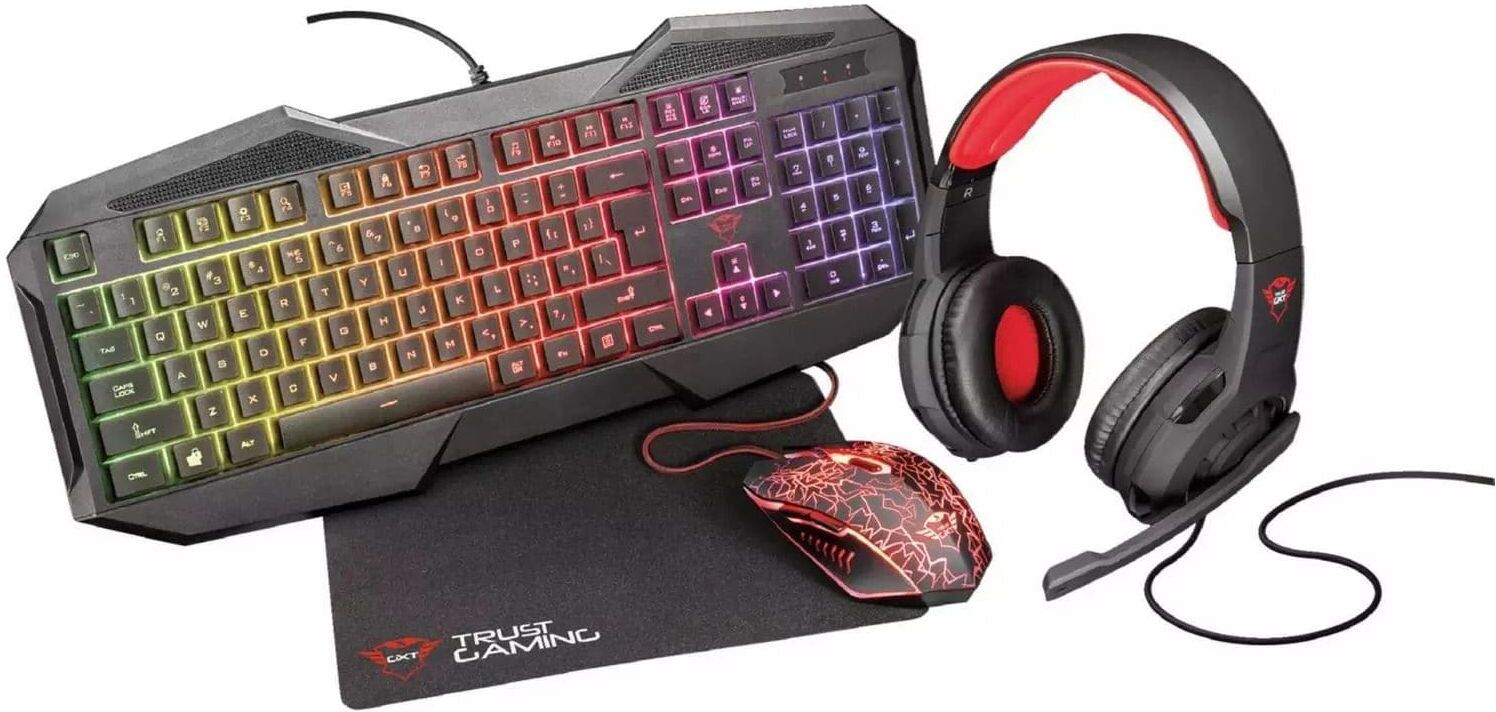
Trust GXT 788RW Keyboard Mouse Headset 4 In 1 Gaming Bundle, NewStep up your gaming setup with the Trust GXT 788RW 4-in-1 Gaming Bundle, the ultimate starter kit for every gamer seeking style, performance, and comfort — all in one box. This high-performance bundle includes a responsive gaming keyboard, precision optical mouse, immersive over-ear headset, and a durable mouse pad, all designed with a sleek gamer aesthetic and vibrant RGB lighting. Whether you're a casual player or an aspiring pro, this all-in-one kit gives you the tools you need to dominate your favorite titles right out of the box. Built for seamless compatibility with PC and gaming consoles, it’s the perfect solution for gamers looking to upgrade with value and quality. ✅ 4-in-1 Complete Gaming Kit – Includes a full-size keyboard, optical mouse, over-ear headset, and a gaming-grade mouse pad. ✅ RGB Backlit Gaming Keyboard – Enjoy dynamic multicolor lighting with anti-ghosting keys for precise and responsive control. ✅ High-Precision Gaming Mouse – Adjustable DPI settings for accurate tracking, perfect for FPS, MOBA, and RTS games. ✅ Comfortable Over-Ear Headset – Delivers powerful sound and clear communication with an adjustable headband and built-in microphone. ✅ Durable Gaming Mouse Pad – Smooth surface for optimal mouse movement and a non-slip rubber base for stability. ✅ Plug & Play Convenience – No software needed — easy USB connectivity for immediate use across platforms. ✅ Compatible with PC & Consoles – Works flawlessly with Windows PCs, laptops, and gaming consoles like PS4/PS5. ✅ Stylish & Durable Design – Rugged construction with a sharp, gamer-centric look to match your setup. ✅ Adjustable Headset Mic – Flexible boom mic ensures crisp team communication during intense gameplay. ✅ Perfect Gift for Gamers – A great choice for beginners or as a gift bundle for birthdays and holidays. The Trust GXT 788RW Gaming Bundle offers unbeatable value for gamers who want to dive right into action without compromising on quality. With everything you need to start gaming, this stylish and functional bundle is your key to immersive, competitive play. Level up your gear and dominate every session in style.25,89 £*Shipping: 0,00 £Secure redirect to the provider
-
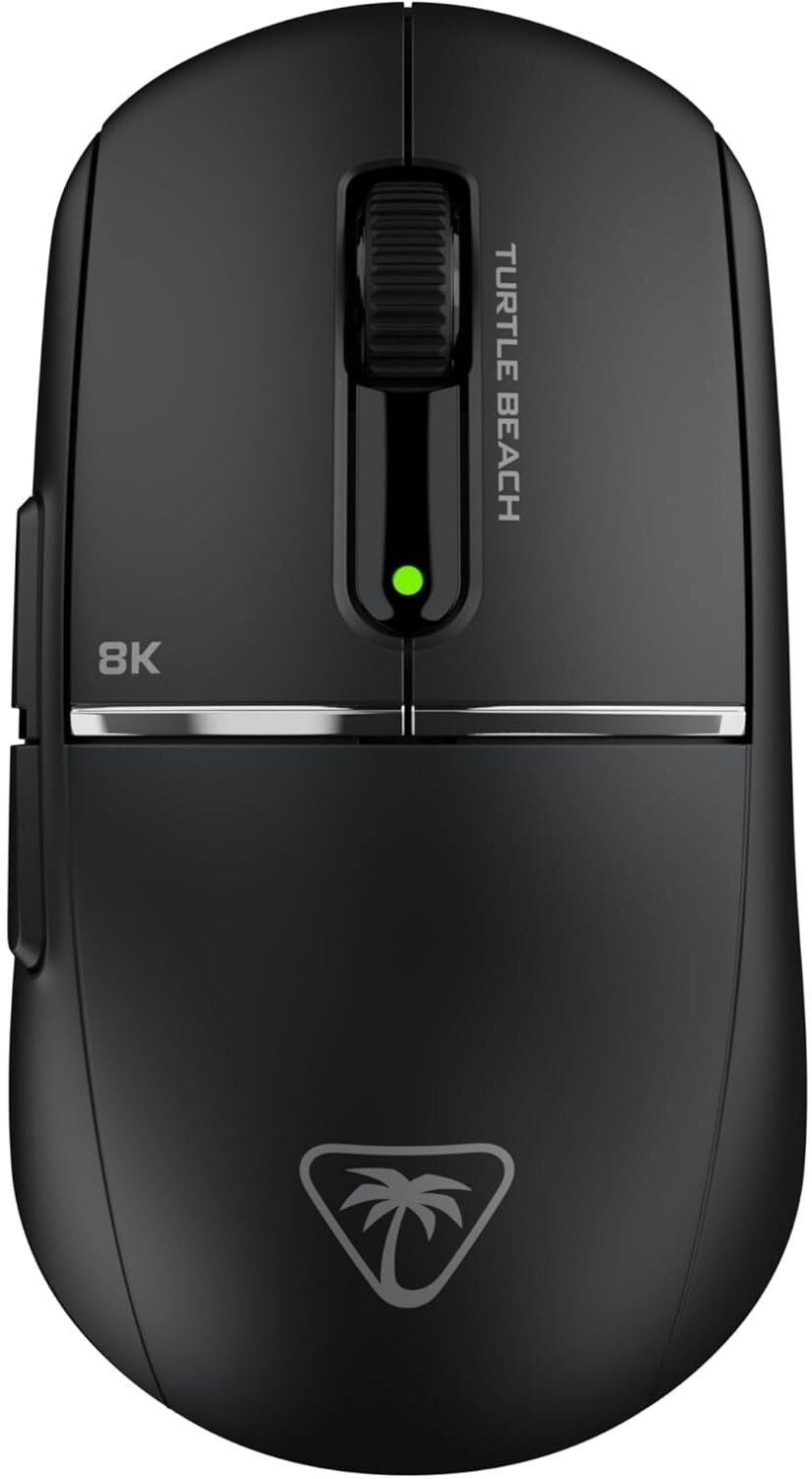
Turtle Beach Burst II Pro Black Wireless Esports Gaming MouseOverview The Turtle Beach Burst II Pro Wireless is a high-performance esports gaming mouse engineered for speed, accuracy, and competitive gameplay. Featuring an ultra-lightweight design, a high-precision 30K DPI optical sensor, and an ultra-fast 8K polling rate, this mouse is built to deliver lightning-fast response times and reliable wireless performance. Designed for serious PC gamers, it combines precision engineering with long battery life to support extended gaming sessions. Key Features • Ultra-lightweight design at approximately 57g for fast movements • Owl-Eye optical sensor with up to 30,000 DPI precision • True 8,000Hz wireless polling rate for ultra-low latency • Titan optical switches rated for up to 100 million clicks • Up to 150-hour battery life depending on polling settings • Dual wireless connectivity including 2.4GHz and Bluetooth • Symmetrical shape suitable for multiple grip styles • Up to 8 programmable buttons for custom controls • Smooth tracking on multiple surfaces including glass • Software customisation for DPI and performance tuning Benefits The Burst II Pro is ideal for competitive gamers who require fast reaction times and precision tracking. Its lightweight build helps reduce fatigue during long gaming sessions, while the 8K polling rate ensures extremely responsive input for FPS and esports titles. With flexible connectivity and long battery life, it is also suitable for users wanting a reliable wireless gaming setup without constant charging. Specifications Specification Details Brand Turtle Beach Model Burst II Pro Colour Black Sensor Owl-Eye Optical Sensor DPI Up to 30,000 DPI Polling Rate Up to 8000Hz Connectivity 2.4GHz Wireless, Bluetooth, USB Buttons Up to 8 Programmable Switch Type Titan Optical Switches Weight Approx. 57g Battery Life Up to 150 Hours Design Symmetrical Usage Esports / Gaming79,98 £*Shipping: 0,00 £Secure redirect to the provider
-
Repos 7 Wonders 2nd Edition Cities Expansion - Board Game - 7 Wonders 2nd Ed: Cities ExpansionExpand your 7 Wonders Second Edition game with the Cities expansion from Repos. This expansion introduces new ways to develop your civilization and adds content for larger games, including components for an eighth player. It also features a new card type, additional cards for existing card types, and optional team rules that allow players to form alliances with neighboring nations, creating additional strategic decisions during play. This expansion is designed exclusively for the Second Edition of 7 Wonders and requires the compatible Second Edition base game to play.21,99 £*Shipping: 3,95 £Secure redirect to the provider
-
Inspire Picks RGB Controller & Headset Stand 7 Mode Gaming Organizer With USB & Type C RGB Controller & Headset Stand 7 Mode Gaming Organizer With USB & Type CGive your gaming station a cleaner, more vibrant setup with this multifunctional RGB controller holder. Designed for compatible PS5, PS4, Xbox, and Switch Pro controllers, it combines gamepad storage with a dedicated headphone stand. Seven RGB light...117,96 $*Shipping: 0,00 $Secure redirect to the provider
-
Controller or mouse/keyboard?
The choice between using a controller or a mouse/keyboard ultimately depends on personal preference and the type of game being played. Controllers are often preferred for games that require precise analog movements, such as platformers or racing games. On the other hand, mouse/keyboard setups are typically favored for first-person shooters and real-time strategy games due to the precision and speed they offer. Some players may even use a combination of both depending on the game and their comfort level with each input method. Ultimately, the best choice is the one that feels most comfortable and natural for the individual player. **
-
How do I switch from console controller to PC keyboard and mouse?
To switch from using a console controller to a PC keyboard and mouse, you will need to disconnect the controller from your computer and connect a keyboard and mouse instead. If you are using a wired controller, simply unplug it from the USB port. If you are using a wireless controller, you may need to turn it off or remove its batteries. Once the controller is disconnected, you can then connect a keyboard and mouse to your computer. Your computer should automatically recognize the new input devices, and you can start using the keyboard and mouse to control your games or applications. **
-
'Controller or mouse and keyboard?'
The choice between using a controller or a mouse and keyboard ultimately comes down to personal preference and the type of game being played. Controllers are often preferred for games that require precise analog movements, such as racing or platformers, while mouse and keyboard are typically better for games that require quick and accurate aiming, like first-person shooters. Some players find controllers more comfortable for long gaming sessions, while others prefer the customization options and precision of a mouse and keyboard setup. Ultimately, the best choice is the one that feels most comfortable and intuitive for the individual player. **
-
Keyboard and mouse or controller?
The choice between keyboard and mouse or controller ultimately depends on personal preference and the type of game being played. Keyboard and mouse are often preferred for first-person shooters and strategy games due to their precision and quick response time. On the other hand, controllers are popular for platformers, racing games, and fighting games because of their comfort and ease of use. Some players may even use a combination of both depending on the game and their own comfort level. Ultimately, it comes down to what feels most natural and enjoyable for the individual player. **
Similar search terms for Cities
-
United Multi Function Gaming Stand With RGB Light Headset Holder And Controller Charging Station Multi Function Gaming Stand With RGB Light Headset Holder And Controller Charging StationTransform your gaming area into a cleaner and more organized setup with this stylish gaming controller stand designed for gamers who want convenience and style in one place. This multifunction stand holds a headset and up to four controllers while...79,97 $*Shipping: 0,00 $Secure redirect to the provider
-
Warhammer Games Workshop Cities Of Sigmar: Freeguild Fusilliers - BlackThe Warhammer Games Workshop Cities of Sigmar: Freeguild Fusiliers – Black are highly detailed 28 mm scale miniatures representing the disciplined, volley-firing infantry of the Freeguild forces in the Mortal Realms. These versatile troops are perfect for both beginners and seasoned generals, offering dependable ranged firepower and firm battlefield presence. With heroic poses, intricate armour, and an iconic aesthetic, the Fusiliers bring narrative flair and tactical depth to your Cities of Sigmar army. ✔️ Detailed Freeguild Design – Classic Empire-inspired soldiers with flintlock rifles, sturdy armour, and historical fantasy flair ✔️ High-Quality Plastic Kit – Durable Games Workshop plastic that’s easy to assemble and perfectly compatible with Citadel paints and basing materials ✔️ Multiple Pose Options – Flexible assembly components let you pose the Fusiliers in a variety of firing and marching stances ✔️ Essential Ranged Infantry – Ideal for filling out core troop slots with reliable volley fire in a wide range of Cities of Sigmar lists ✔️ Narrative Table Presence – Dynamic sculpts with flag, guns, and gear that enhance themed armies and storytelling games ✔️ Perfect for Customisation – Compatible with other Cities of Sigmar kits for conversions, unit upgrades, and terrain-matched basing ✔️ Great Starter or Expansion Unit – Works equally well as an entry point into Sigmar’s forces or as added depth for established armies ✔️ Paint & Play Friendly – Excellent canvas for hobbyists to showcase brushwork, weathering, and freehand army colours The Freeguild Fusiliers are more than just miniatures—they’re the backbone of a well-rounded Cities of Sigmar force, ready to deliver disciplined volleys and bring narrative character to your tabletop battles and hobby collection.36,99 £*Shipping: 0,00 £Secure redirect to the provider
-
Create & Construct: Incredible Minecraft Cities by Kirsten Kearney - PaperbackTitle:. Create & Construct: Incredible Minecraft Cities. Condition: BRAND NEW. Format: Paperback. ISBN: 9786845564839. Overview:. Unlock the full potential of Minecraft with Create & Construct: Incredible Minecraft Cities by Kirsten Kearney. This hands-on guide invites builders of all ages to transform a blank grid into vibrant, living urban landscapes. Inside, you’ll find a clear, step-by-step program to plan and build bustling city districts—from gleaming skylines and lively streets to atmospheric neighborhoods that feel lived-in. The book balances practical techniques with vivid creative prompts, helping you move from rough sketches to show-stopping builds. Learn how to lay out road networks, optimize space, and apply architectural styles that suit different eras and themes. Beyond mere blocks, the projects show you how to design function—bridges, transit hubs, and multi-level districts that work together as a city. You’ll also discover fun, imaginative builds such as vehicles, furniture, and even thrilling features like roller coasters and fantasy landmarks. Designed for beginners through to confident builders, the guide includes checklists, tips, and plenty of diagrams to keep you motivated and on track. Kirsten Kearney brings a journalist’s eye for clarity and a maker’s instinct for inspiration, so you’ll finish each project with confidence, ready to showcase your metropolis on a server, in a classroom, or your personal creative world.. What Makes This Book Stand Out:. What makes Create & Construct truly special is its practical, builder-friendly approach to city-making in a blocky world. It isn’t just about stacking towers; it teaches you to think in terms of space, rhythm, and scale so your city feels coherent rather than compiled. The author breaks the process into approachable stages—site planning, zoning, façade variety, lighting, and detail work—so you can achieve professional-looking results even if you’re new to Minecraft. The book blends real-world urban design ideas with Minecraft-friendly techniques, providing reproducible templates, anchor concepts, and a rich library of building ideas you can adapt. It also expands your toolkit with vehicle schematics, furniture layouts, and thrill rides, turning a single city block into an interconnected urban experience. The tone is encouraging without being preachy, making it ideal for school projects, family build nights, or solo marathons of creativity, while always delivering fresh inspiration and practical, repeatable methods.. Who This Book Is Perfect For:. This book is ideal for aspiring Minecraft architects, creative kids and teens, and adults who love virtual city-building. It’s great for classroom projects, after-school clubs, and family gaming sessions where collaboration sparks new ideas. Parents and teachers will value the clear, structured approach that turns big dreams into doable builds, while Minecraft enthusiasts seeking a deeper, more cinematic city aesthetic will...2,99 £*Shipping: 2,99 £Secure redirect to the provider
-
United PS5 Controller Holder And Xbox Series X Controller Stand Gaming Headset Hanger Organizer 1pcKeep your gaming space neat and always ready for action with this PS5 controller holder designed for modern gamers. Compatible with PS5 and Xbox Series X consoles, it provides a convenient place to store your controller, headset, and small gaming...31,97 $*Shipping: 0,00 $Secure redirect to the provider
-
Which gaming PC is good and which monitor and keyboard-mouse?
There are many good gaming PCs on the market, but some popular options include the Alienware Aurora R11, the HP Omen Obelisk, and the CyberPowerPC Gamer Xtreme. When it comes to monitors, the ASUS ROG Swift PG279Q and the Acer Predator XB271HU are highly regarded for their high refresh rates and low response times. For keyboards and mice, the Logitech G Pro X keyboard and the Razer DeathAdder Elite mouse are popular choices among gamers for their performance and customizable features. Ultimately, the best gaming PC, monitor, keyboard, and mouse will depend on your specific needs and budget. **
-
Are the mouse movements in Cities Skylines reversed?
No, the mouse movements in Cities Skylines are not reversed. The game follows the standard mouse movement controls, where moving the mouse to the left will pan the camera to the left, and moving the mouse to the right will pan the camera to the right. Up and down movements also correspond to the expected camera movements in the game. Overall, the mouse movements in Cities Skylines are intuitive and follow the standard conventions for camera controls in video games. **
-
Which gaming mouse and keyboard?
For gaming mouse, I would recommend the Logitech G502 Hero. It has a high-precision sensor, customizable weights, and programmable buttons, making it great for gaming. As for the keyboard, the Corsair K70 RGB MK.2 is a popular choice among gamers. It has mechanical switches, customizable RGB lighting, and dedicated media controls, providing a great gaming experience. Both of these peripherals are highly regarded for their performance and customization options. **
-
Why is there no mouse cursor in Cities: Skylines?
In Cities: Skylines, there is no mouse cursor visible during gameplay because the game is designed to provide a more immersive experience for players. The absence of a cursor allows players to focus on the city-building aspect of the game without distractions. Instead, players can use keyboard shortcuts and the camera controls to navigate and interact with the game world more efficiently. This design choice also helps to create a cleaner and more visually appealing interface for players. **
* All prices are inclusive of VAT and, if applicable, plus shipping costs. The offer information is based on the details provided by the respective shop and is updated through automated processes. Real-time updates do not occur, so deviations can occur in individual cases. ** Note: Parts of this content were created by AI.