Buy gamingshop.eu ?
We are moving the project
gamingshop.eu .
Are you interested in purchasing the domain
gamingshop.eu ?
domain@kv-gmbh.de · 0541-91531010
Buy gamingshop.eu ?
Controller or mouse/keyboard?
The choice between using a controller or a mouse/keyboard ultimately depends on personal preference and the type of game being played. Controllers are often preferred for games that require precise analog movements, such as platformers or racing games. On the other hand, mouse/keyboard setups are typically favored for first-person shooters and real-time strategy games due to the precision and speed they offer. Some players may even use a combination of both depending on the game and their comfort level with each input method. Ultimately, the best choice is the one that feels most comfortable and natural for the individual player. **
Riding participation or care participation or something else?
It depends on the individual's interests and preferences. Riding participation involves actively engaging in horseback riding, which can be a thrilling and physically demanding activity. Care participation involves taking care of the horses, which can be rewarding and fulfilling for those who enjoy building a bond with animals and being responsible for their well-being. Ultimately, the choice between riding participation, care participation, or something else should be based on what brings the most enjoyment and satisfaction to the individual. **
Similar search terms for Participation
Top-Angebote
Products related to Participation:
-
Isabella Wallace & Leah Kirkman Talk-Less Teaching: Practice, Participation and Progress - Non Fiction - PaperbackTitle:. Talk-Less Teaching: Practice, Participation and Progress Condition: BRAND NEW. Format: Paperback. ISBN: 9781845909284 Overview:. Talk-Less Teaching: Practice, Participation and Progress invites teachers to rethink classroom dialogue. The book argues that while teacher-talk is essential for direction and clarity, long stretches of monologue can dampen curiosity and stunt independent thinking. It offers a pragmatic framework for balancing teacher input with structured student talk and collaborative tasks that push pupils to articulate ideas, justify reasoning and monitor their own progress. You’ll discover practical, ready-to-use strategies to shorten instructions without sacrificing learning outcomes: precise questioning techniques that invite explanation, purposeful pair and group work that increases accountability, and formative checks that reveal understanding without interrupting flow. The approach is designed to be realistic for busy classrooms, integrating with existing schemes of work and assessment cycles. Each chapter provides clear steps, printable templates, and quick-start activities you can deploy from day one. By shifting some of the talking from teacher to pupil, you’ll surface misconceptions earlier, build language for subject concepts, and create a learning environment where progress is visible and measurable. The writing is practical, accessible, and suitable for both veteran teachers and trainees alike. The author keeps theory in check and hands you ready-to-use techniques you can adapt instantly. What Makes This Book Stand Out:. Unlike traditional texts that celebrate classroom talk without guidance, Talk-Less Teaching foregrounds deliberate, evidence-informed strategies that put student reasoning at the centre. The book offers a coherent, step-by-step framework for reducing unnecessary teacher talk while preserving clarity, direction and high expectations. It champions purposeful dialogue: structured think-pair-share, rotational questioning, and collaborative task design that invites every pupil to contribute. Real-world classroom examples illustrate how to scaffold discussion so quieter students are heard, while more confident learners are challenged to justify their thinking. The book also addresses assessment and progress: how to check understanding without interrupting momentum, how to track individual and class-wide growth, and how to align talk-based activities with curriculum goals. Practical templates, checklists and example lesson plans help teachers translate theory into everyday practice. This is a resource built for busy schools where time is precious, yet progress is non-negotiable. The writing remains clear, concrete and ready for immediate classroom impact. Who This Book Is Perfect For:. Designed for educators who want to balance clear instruction with meaningful student talk, Talk-Less Teaching is ideal for primary and secondary teachers, trainee teachers, and subject leaders. It will appeal to...10,17 £*Shipping: 2,99 £Secure redirect to the provider
-
Inspire Picks RGB Controller & Headset Stand 7 Mode Gaming Organizer With USB & Type C RGB Controller & Headset Stand 7 Mode Gaming Organizer With USB & Type CGive your gaming station a cleaner, more vibrant setup with this multifunctional RGB controller holder. Designed for compatible PS5, PS4, Xbox, and Switch Pro controllers, it combines gamepad storage with a dedicated headphone stand. Seven RGB light...117,96 $*Shipping: 0,00 $Secure redirect to the provider
-
United Multi Function Gaming Stand With RGB Light Headset Holder And Controller Charging Station Multi Function Gaming Stand With RGB Light Headset Holder And Controller Charging StationTransform your gaming area into a cleaner and more organized setup with this stylish gaming controller stand designed for gamers who want convenience and style in one place. This multifunction stand holds a headset and up to four controllers while...79,97 $*Shipping: 0,00 $Secure redirect to the provider
-
United PS5 Controller Holder And Xbox Series X Controller Stand Gaming Headset Hanger Organizer 1pcKeep your gaming space neat and always ready for action with this PS5 controller holder designed for modern gamers. Compatible with PS5 and Xbox Series X consoles, it provides a convenient place to store your controller, headset, and small gaming...31,97 $*Shipping: 0,00 $Secure redirect to the provider


-
How do I switch from console controller to PC keyboard and mouse?
To switch from using a console controller to a PC keyboard and mouse, you will need to disconnect the controller from your computer and connect a keyboard and mouse instead. If you are using a wired controller, simply unplug it from the USB port. If you are using a wireless controller, you may need to turn it off or remove its batteries. Once the controller is disconnected, you can then connect a keyboard and mouse to your computer. Your computer should automatically recognize the new input devices, and you can start using the keyboard and mouse to control your games or applications. **
-
'Controller or mouse and keyboard?'
The choice between using a controller or a mouse and keyboard ultimately comes down to personal preference and the type of game being played. Controllers are often preferred for games that require precise analog movements, such as racing or platformers, while mouse and keyboard are typically better for games that require quick and accurate aiming, like first-person shooters. Some players find controllers more comfortable for long gaming sessions, while others prefer the customization options and precision of a mouse and keyboard setup. Ultimately, the best choice is the one that feels most comfortable and intuitive for the individual player. **
-
Keyboard and mouse or controller?
The choice between keyboard and mouse or controller ultimately depends on personal preference and the type of game being played. Keyboard and mouse are often preferred for first-person shooters and strategy games due to their precision and quick response time. On the other hand, controllers are popular for platformers, racing games, and fighting games because of their comfort and ease of use. Some players may even use a combination of both depending on the game and their own comfort level. Ultimately, it comes down to what feels most natural and enjoyable for the individual player. **
-
Which gaming PC is good and which monitor and keyboard-mouse?
There are many good gaming PCs on the market, but some popular options include the Alienware Aurora R11, the HP Omen Obelisk, and the CyberPowerPC Gamer Xtreme. When it comes to monitors, the ASUS ROG Swift PG279Q and the Acer Predator XB271HU are highly regarded for their high refresh rates and low response times. For keyboards and mice, the Logitech G Pro X keyboard and the Razer DeathAdder Elite mouse are popular choices among gamers for their performance and customizable features. Ultimately, the best gaming PC, monitor, keyboard, and mouse will depend on your specific needs and budget. **


What accessories can I bring with me for a new horse riding participation?
When participating in horse riding, it's important to bring essential accessories such as a properly fitted helmet to ensure safety. Additionally, wearing appropriate footwear such as riding boots with a small heel and a comfortable pair of gloves can provide better grip and protection for your hands. It's also a good idea to bring a water bottle to stay hydrated during the activity. Lastly, consider bringing a riding crop or whip if it's allowed and necessary for your riding experience. **
Which gaming mouse and keyboard?
For gaming mouse, I would recommend the Logitech G502 Hero. It has a high-precision sensor, customizable weights, and programmable buttons, making it great for gaming. As for the keyboard, the Corsair K70 RGB MK.2 is a popular choice among gamers. It has mechanical switches, customizable RGB lighting, and dedicated media controls, providing a great gaming experience. Both of these peripherals are highly regarded for their performance and customization options. **
Top-Angebote
Products related to Participation:
-
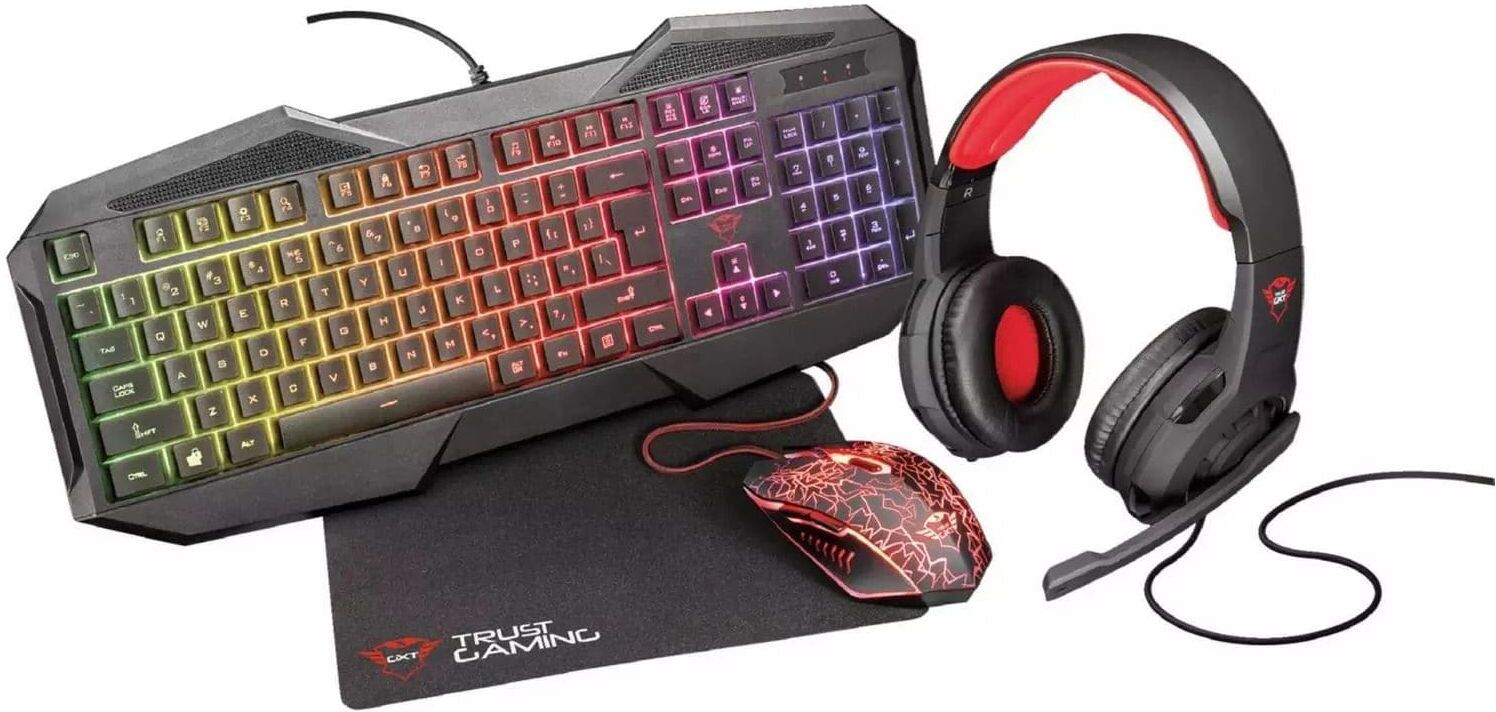
Trust GXT 788RW Keyboard Mouse Headset 4 In 1 Gaming Bundle, NewStep up your gaming setup with the Trust GXT 788RW 4-in-1 Gaming Bundle, the ultimate starter kit for every gamer seeking style, performance, and comfort — all in one box. This high-performance bundle includes a responsive gaming keyboard, precision optical mouse, immersive over-ear headset, and a durable mouse pad, all designed with a sleek gamer aesthetic and vibrant RGB lighting. Whether you're a casual player or an aspiring pro, this all-in-one kit gives you the tools you need to dominate your favorite titles right out of the box. Built for seamless compatibility with PC and gaming consoles, it’s the perfect solution for gamers looking to upgrade with value and quality. ✅ 4-in-1 Complete Gaming Kit – Includes a full-size keyboard, optical mouse, over-ear headset, and a gaming-grade mouse pad. ✅ RGB Backlit Gaming Keyboard – Enjoy dynamic multicolor lighting with anti-ghosting keys for precise and responsive control. ✅ High-Precision Gaming Mouse – Adjustable DPI settings for accurate tracking, perfect for FPS, MOBA, and RTS games. ✅ Comfortable Over-Ear Headset – Delivers powerful sound and clear communication with an adjustable headband and built-in microphone. ✅ Durable Gaming Mouse Pad – Smooth surface for optimal mouse movement and a non-slip rubber base for stability. ✅ Plug & Play Convenience – No software needed — easy USB connectivity for immediate use across platforms. ✅ Compatible with PC & Consoles – Works flawlessly with Windows PCs, laptops, and gaming consoles like PS4/PS5. ✅ Stylish & Durable Design – Rugged construction with a sharp, gamer-centric look to match your setup. ✅ Adjustable Headset Mic – Flexible boom mic ensures crisp team communication during intense gameplay. ✅ Perfect Gift for Gamers – A great choice for beginners or as a gift bundle for birthdays and holidays. The Trust GXT 788RW Gaming Bundle offers unbeatable value for gamers who want to dive right into action without compromising on quality. With everything you need to start gaming, this stylish and functional bundle is your key to immersive, competitive play. Level up your gear and dominate every session in style.25,89 £*Shipping: 0,00 £Secure redirect to the provider
-
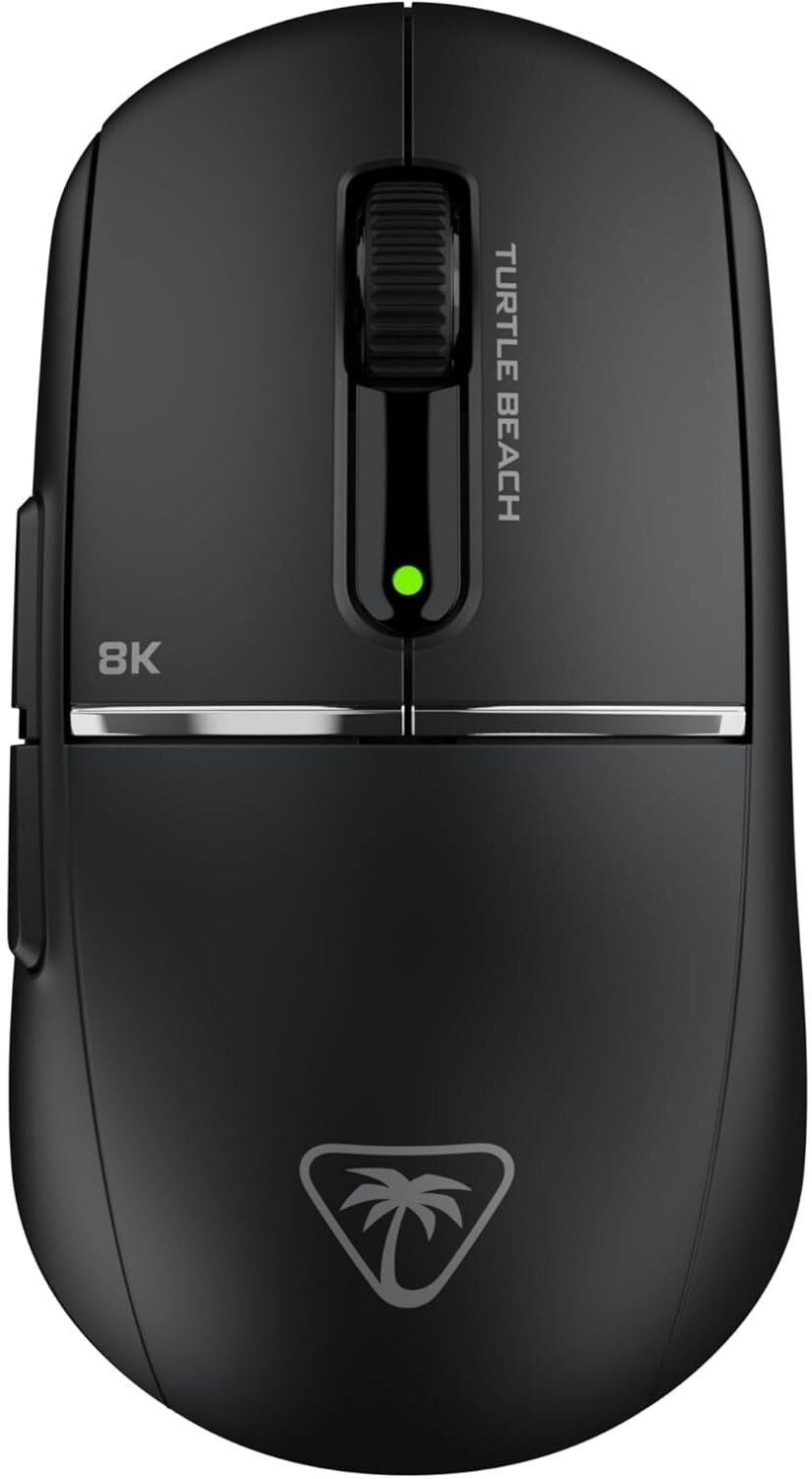
Turtle Beach Burst II Pro Black Wireless Esports Gaming MouseOverview The Turtle Beach Burst II Pro Wireless is a high-performance esports gaming mouse engineered for speed, accuracy, and competitive gameplay. Featuring an ultra-lightweight design, a high-precision 30K DPI optical sensor, and an ultra-fast 8K polling rate, this mouse is built to deliver lightning-fast response times and reliable wireless performance. Designed for serious PC gamers, it combines precision engineering with long battery life to support extended gaming sessions. Key Features • Ultra-lightweight design at approximately 57g for fast movements • Owl-Eye optical sensor with up to 30,000 DPI precision • True 8,000Hz wireless polling rate for ultra-low latency • Titan optical switches rated for up to 100 million clicks • Up to 150-hour battery life depending on polling settings • Dual wireless connectivity including 2.4GHz and Bluetooth • Symmetrical shape suitable for multiple grip styles • Up to 8 programmable buttons for custom controls • Smooth tracking on multiple surfaces including glass • Software customisation for DPI and performance tuning Benefits The Burst II Pro is ideal for competitive gamers who require fast reaction times and precision tracking. Its lightweight build helps reduce fatigue during long gaming sessions, while the 8K polling rate ensures extremely responsive input for FPS and esports titles. With flexible connectivity and long battery life, it is also suitable for users wanting a reliable wireless gaming setup without constant charging. Specifications Specification Details Brand Turtle Beach Model Burst II Pro Colour Black Sensor Owl-Eye Optical Sensor DPI Up to 30,000 DPI Polling Rate Up to 8000Hz Connectivity 2.4GHz Wireless, Bluetooth, USB Buttons Up to 8 Programmable Switch Type Titan Optical Switches Weight Approx. 57g Battery Life Up to 150 Hours Design Symmetrical Usage Esports / Gaming79,98 £*Shipping: 0,00 £Secure redirect to the provider
-
Isabella Wallace & Leah Kirkman Talk-Less Teaching: Practice, Participation and Progress - Non Fiction - PaperbackTitle:. Talk-Less Teaching: Practice, Participation and Progress Condition: BRAND NEW. Format: Paperback. ISBN: 9781845909284 Overview:. Talk-Less Teaching: Practice, Participation and Progress invites teachers to rethink classroom dialogue. The book argues that while teacher-talk is essential for direction and clarity, long stretches of monologue can dampen curiosity and stunt independent thinking. It offers a pragmatic framework for balancing teacher input with structured student talk and collaborative tasks that push pupils to articulate ideas, justify reasoning and monitor their own progress. You’ll discover practical, ready-to-use strategies to shorten instructions without sacrificing learning outcomes: precise questioning techniques that invite explanation, purposeful pair and group work that increases accountability, and formative checks that reveal understanding without interrupting flow. The approach is designed to be realistic for busy classrooms, integrating with existing schemes of work and assessment cycles. Each chapter provides clear steps, printable templates, and quick-start activities you can deploy from day one. By shifting some of the talking from teacher to pupil, you’ll surface misconceptions earlier, build language for subject concepts, and create a learning environment where progress is visible and measurable. The writing is practical, accessible, and suitable for both veteran teachers and trainees alike. The author keeps theory in check and hands you ready-to-use techniques you can adapt instantly. What Makes This Book Stand Out:. Unlike traditional texts that celebrate classroom talk without guidance, Talk-Less Teaching foregrounds deliberate, evidence-informed strategies that put student reasoning at the centre. The book offers a coherent, step-by-step framework for reducing unnecessary teacher talk while preserving clarity, direction and high expectations. It champions purposeful dialogue: structured think-pair-share, rotational questioning, and collaborative task design that invites every pupil to contribute. Real-world classroom examples illustrate how to scaffold discussion so quieter students are heard, while more confident learners are challenged to justify their thinking. The book also addresses assessment and progress: how to check understanding without interrupting momentum, how to track individual and class-wide growth, and how to align talk-based activities with curriculum goals. Practical templates, checklists and example lesson plans help teachers translate theory into everyday practice. This is a resource built for busy schools where time is precious, yet progress is non-negotiable. The writing remains clear, concrete and ready for immediate classroom impact. Who This Book Is Perfect For:. Designed for educators who want to balance clear instruction with meaningful student talk, Talk-Less Teaching is ideal for primary and secondary teachers, trainee teachers, and subject leaders. It will appeal to...10,17 £*Shipping: 2,99 £Secure redirect to the provider
-
Inspire Picks RGB Controller & Headset Stand 7 Mode Gaming Organizer With USB & Type C RGB Controller & Headset Stand 7 Mode Gaming Organizer With USB & Type CGive your gaming station a cleaner, more vibrant setup with this multifunctional RGB controller holder. Designed for compatible PS5, PS4, Xbox, and Switch Pro controllers, it combines gamepad storage with a dedicated headphone stand. Seven RGB light...117,96 $*Shipping: 0,00 $Secure redirect to the provider
-
Controller or mouse/keyboard?
The choice between using a controller or a mouse/keyboard ultimately depends on personal preference and the type of game being played. Controllers are often preferred for games that require precise analog movements, such as platformers or racing games. On the other hand, mouse/keyboard setups are typically favored for first-person shooters and real-time strategy games due to the precision and speed they offer. Some players may even use a combination of both depending on the game and their comfort level with each input method. Ultimately, the best choice is the one that feels most comfortable and natural for the individual player. **
-
Riding participation or care participation or something else?
It depends on the individual's interests and preferences. Riding participation involves actively engaging in horseback riding, which can be a thrilling and physically demanding activity. Care participation involves taking care of the horses, which can be rewarding and fulfilling for those who enjoy building a bond with animals and being responsible for their well-being. Ultimately, the choice between riding participation, care participation, or something else should be based on what brings the most enjoyment and satisfaction to the individual. **
-
How do I switch from console controller to PC keyboard and mouse?
To switch from using a console controller to a PC keyboard and mouse, you will need to disconnect the controller from your computer and connect a keyboard and mouse instead. If you are using a wired controller, simply unplug it from the USB port. If you are using a wireless controller, you may need to turn it off or remove its batteries. Once the controller is disconnected, you can then connect a keyboard and mouse to your computer. Your computer should automatically recognize the new input devices, and you can start using the keyboard and mouse to control your games or applications. **
-
'Controller or mouse and keyboard?'
The choice between using a controller or a mouse and keyboard ultimately comes down to personal preference and the type of game being played. Controllers are often preferred for games that require precise analog movements, such as racing or platformers, while mouse and keyboard are typically better for games that require quick and accurate aiming, like first-person shooters. Some players find controllers more comfortable for long gaming sessions, while others prefer the customization options and precision of a mouse and keyboard setup. Ultimately, the best choice is the one that feels most comfortable and intuitive for the individual player. **
Similar search terms for Participation
-
United Multi Function Gaming Stand With RGB Light Headset Holder And Controller Charging Station Multi Function Gaming Stand With RGB Light Headset Holder And Controller Charging StationTransform your gaming area into a cleaner and more organized setup with this stylish gaming controller stand designed for gamers who want convenience and style in one place. This multifunction stand holds a headset and up to four controllers while...79,97 $*Shipping: 0,00 $Secure redirect to the provider
-
United PS5 Controller Holder And Xbox Series X Controller Stand Gaming Headset Hanger Organizer 1pcKeep your gaming space neat and always ready for action with this PS5 controller holder designed for modern gamers. Compatible with PS5 and Xbox Series X consoles, it provides a convenient place to store your controller, headset, and small gaming...31,97 $*Shipping: 0,00 $Secure redirect to the provider
-
Inspire Picks Metal Headset & Controller Stand Universal Gaming Accessory Organizer two TierKeep your gaming essentials organized and within easy reach with this versatile headset stand. Designed for compatible PS5, Xbox, Nintendo Switch, and PS4 controllers, it combines convenient gamepad storage with a dedicated headphone holder. The...67,44 $*Shipping: 0,00 $Secure redirect to the provider
-
United PS5 Controller Holder And Xbox Series X Controller Stand Gaming Headset Hanger Organizer 2pcsKeep your gaming space neat and always ready for action with this PS5 controller holder designed for modern gamers. Compatible with PS5 and Xbox Series X consoles, it provides a convenient place to store your controller, headset, and small gaming...34,97 $*Shipping: 0,00 $Secure redirect to the provider
-
Keyboard and mouse or controller?
The choice between keyboard and mouse or controller ultimately depends on personal preference and the type of game being played. Keyboard and mouse are often preferred for first-person shooters and strategy games due to their precision and quick response time. On the other hand, controllers are popular for platformers, racing games, and fighting games because of their comfort and ease of use. Some players may even use a combination of both depending on the game and their own comfort level. Ultimately, it comes down to what feels most natural and enjoyable for the individual player. **
-
Which gaming PC is good and which monitor and keyboard-mouse?
There are many good gaming PCs on the market, but some popular options include the Alienware Aurora R11, the HP Omen Obelisk, and the CyberPowerPC Gamer Xtreme. When it comes to monitors, the ASUS ROG Swift PG279Q and the Acer Predator XB271HU are highly regarded for their high refresh rates and low response times. For keyboards and mice, the Logitech G Pro X keyboard and the Razer DeathAdder Elite mouse are popular choices among gamers for their performance and customizable features. Ultimately, the best gaming PC, monitor, keyboard, and mouse will depend on your specific needs and budget. **
-
What accessories can I bring with me for a new horse riding participation?
When participating in horse riding, it's important to bring essential accessories such as a properly fitted helmet to ensure safety. Additionally, wearing appropriate footwear such as riding boots with a small heel and a comfortable pair of gloves can provide better grip and protection for your hands. It's also a good idea to bring a water bottle to stay hydrated during the activity. Lastly, consider bringing a riding crop or whip if it's allowed and necessary for your riding experience. **
-
Which gaming mouse and keyboard?
For gaming mouse, I would recommend the Logitech G502 Hero. It has a high-precision sensor, customizable weights, and programmable buttons, making it great for gaming. As for the keyboard, the Corsair K70 RGB MK.2 is a popular choice among gamers. It has mechanical switches, customizable RGB lighting, and dedicated media controls, providing a great gaming experience. Both of these peripherals are highly regarded for their performance and customization options. **
* All prices are inclusive of VAT and, if applicable, plus shipping costs. The offer information is based on the details provided by the respective shop and is updated through automated processes. Real-time updates do not occur, so deviations can occur in individual cases. ** Note: Parts of this content were created by AI.